Formula
Formula
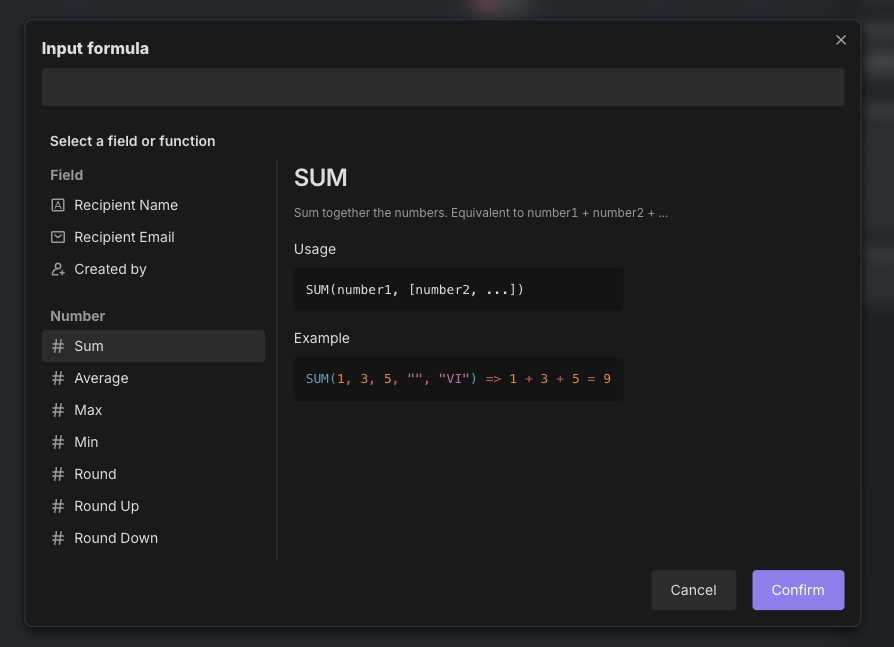
Formula is a mathematical expression composed of functions, operators, and parameters. Input values can be processed through formulas to obtain expected output values.
Bika.ai has prepared a variety of formula functions to help you efficiently calculate and process tabular data, reducing the cost of manual calculations and avoiding manual entry errors.
Syntax
Smart formula expressions contain the following elements:
- Field references:Use
{{field name}}to reference other fields in the database. For example,{{unit price}} * {{quantity}}represents unit price multiplied by quantity. - Operators:Support common arithmetic operators(
+、-、*、/、%), comparison operators(==、!=、>、<、>=、<=)and logical operators(&&、||、!). - Functions:Support built-in functions, such as
NOW()、DAY(), etc. - Constants:Support numbers, strings, boolean values, and
null.
Formula Functions and Operators Summary
The formulas/operators column in the tables below shows the standard expression of functions, where certain parameters are represented in English. Parameter explanations are as follows:
string: string parameter text: text parameter logical: logical parameter number: numeric parameter date: date parameter item: array parameter
Parameters in "[ ]" are optional parameters, meaning they can be omitted when using the function. In array functions, this symbol represents a group of data.
Formula Operators
Category | Name | Syntax | Description |
Numeric | Addition | + | Adds two numeric values. |
Numeric | Subtraction | - | Subtracts two numeric values. |
Numeric | Multiplication | * | Multiplies two numeric values. |
Numeric | Division | / | Divides two numeric values. |
Text | Concatenation | & | Joins two text values together. |
Logical | Greater than | > | Tests if the first value is greater than the second value. |
Logical | Greater than or equal to | >= | Tests if the first value is greater than or equal to the second value. |
Logical | Less than | < | Tests if the first value is less than the second value. |
Logical | Less than or equal to | <= | Tests if the first value is less than or equal to the second value. |
Logical | Equal to | = | Tests if the first value equals the second value. |
Logical | Not equal to | != | Tests if the first value does not equal the second value. |
Logical | AND | && | Represents the logical AND of two conditions. |
Logical | OR | || | Represents the logical OR of two conditions. |
Numeric Functions
Name | Syntax | Description |
SUM() | SUM(number1, [number2, …]) | Adds all numeric values. |
AVERAGE() | AVERAGE(number1, [number2, …]) | Returns the arithmetic mean of multiple values. |
MAX() | MAX(number1, [number2, …]) | Returns the maximum value from multiple values. |
MIN() | MIN(number1, [number2, …]) | Returns the minimum value from multiple values. |
ROUND() | ROUND(value, precision) | Rounds a number to a specified number of digits. |
ROUNDUP() | ROUNDUP(value, precision) | Rounds a number up, away from zero. |
ROUNDDOWN() | ROUNDDOWN(value, precision) | Rounds a number down, toward zero. |
CEILING() | CEILING(value, [significance]) | Rounds a number up to the nearest multiple of a specified base. |
FLOOR() | FLOOR(value, [significance]) | Rounds a number down to the nearest multiple of a specified base. |
EVEN() | EVEN(value) | Rounds a number up to the nearest even integer. |
ODD() | ODD(value) | Rounds a number up to the nearest odd integer. |
INT() | INT(value) | Rounds a number down to the nearest integer. |
ABS() | ABS(value) | Returns the absolute value of a number. |
SQRT() | SQRT(value) | Calculates the square root of a number. |
MOD() | MOD(value, divisor) | Returns the remainder after a number is divided by a divisor. |
POWER() | POWER(base, power) | Raises a number (the base) to power. |
EXP() | EXP(power) | Calculates e raised to the power of a number. |
LOG() | LOG(number, base=10) | Calculates the logarithm of a number with a specified base. |
VALUE() | VALUE(text) | Converts a text value to a number. |
Text Functions
Name | Syntax | Description |
CONCATENATE() | CONCATENATE(text1, [text2, …]) | Joins multiple text values into a single text value. (Has the same effect as &) |
FIND() | FIND(stringToFind, whereToSearch,[startFromPosition]) | Finds the position of the first occurrence of specific text within content. |
SEARCH() | SEARCH(stringToFind, whereToSearch,[startFromPosition]) | Searches for the position of the first occurrence of specific text within content. |
MID() | MID(string, whereToStart, count) | Extracts a fixed-length segment of text from a specific position within content. |
REPLACE() | REPLACE(string, start_character, number_of_characters, replacement) | Replaces a segment of text at a specific position with new text. |
SUBSTITUTE() | SUBSTITUTE(string, old_text, new_text, [index]) | Replaces all occurrences of specific content in text with new content. |
LEN() | LEN(string) | Counts the number of characters in a text string. |
LEFT() | LEFT(string, howMany) | Extracts a specified number of characters from the beginning of text. |
RIGHT() | RIGHT(string, howMany) | Extracts a specified number of characters from the end of text. |
LOWER() | LOWER(string) | Converts all uppercase letters to lowercase letters. |
UPPER() | UPPER(string) | Converts all lowercase letters to uppercase letters. |
REPT() | REPT(string, number) | Repeats text content a specified number of times. |
T() | T(value) | Determines if content is a text value. |
TRIM() | TRIM(string) | Removes spaces from the beginning and end of text. |
ENCODE_URL_COMPONENT() | ENCODE_URL_COMPONENT(component_string) | Encodes text into URL format. |
Logical Functions
Name | Syntax | Description |
IF() | IF(logical, value1, value2) | Tests if a condition is met; returns the first value if true, the second value if false. |
SWITCH() | SWITCH(expression, [pattern, result… ],[default]) | A multi-branch selection function composed of an expression + multiple (branch + return value) pairs. If the expression equals a branch value, the function outputs the corresponding return value. |
TRUE() | TRUE() | Returns the logical value true. |
FALSE() | FALSE() | Returns the logical value false. |
AND() | AND(logical1, [logical2, …]) | Returns true if all arguments are true; otherwise, returns false. |
OR() | OR(logical1, [logical2, …]) | Returns true if any argument is true; otherwise, returns false. |
XOR() | XOR(logical1, [logical2, …]) | Returns true if an odd number of arguments are true; otherwise, returns false. |
BLANK() | BLANK() | Represents an empty value. |
ERROR() | ERROR(message) | Displays an error message and information in a cell. |
IS_ERROR() | IS_ERROR(expression) | Checks if an expression results in an error; returns true if there is an error. |
NOT() | NOT(logical) | Reverses a logical condition. |
Date Functions
Name | Syntax | Description |
TODAY() | TODAY() | Returns today's date (year, month, day), but not the time (defaults to 00:00:00). Use the NOW() function if you need the exact time. |
NOW() | NOW() | Return today's date and time, including hours, minutes, and seconds. |
TONOW() | TONOW(date, units) | Returns the absolute difference between the current date and a specified date. |
FROMNOW() | FROMNOW(date, units) | Returns the absolute difference between the current date and a specified date. |
DATEADD() | DATEADD(date, count, units) | Adds a fixed time interval to a specified date. |
DATETIME_DIFF() | DATETIME_DIFF(date1, date2, units) | Returns the difference between two dates (with sign), i.e., date1 minus date2. |
WORKDAY() | WORKDAY(startDate, numDays, [holidays]) | Return the date after a specified number of workdays from a start date. |
WORKDAY_DIFF() | WORKDAY_DIFF(startDate, endDate, [holidays]) | Counts the number of workdays between two dates (with signs). |
IS_AFTER() | IS_AFTER(date1, date2) | Compares if date1 is later than date2; returns true if later, otherwise returns false. |
IS_BEFORE() | IS_BEFORE(date1, date2) | Compares if date1 is earlier than date2; returns true if earlier, otherwise returns false. |
IS_SAME() | IS_SAME(date1, date2, [units]) | Compares if date1 equals date2; returns true if equal, otherwise returns false. |
DATETIME_FORMAT() | DATETIME_FORMAT(date, specified_output_format) | Formats a date as text in a custom format. |
DATETIME_PARSE() | DATETIME_PARSE(date, [input_format]) | Converts text to a structured date type. |
DATESTR() | DATESTR(date) | Formats a date as "year-month-day" text (fixed format: YYYY-MM-DD). |
TIMESTR() | TIMESTR(date) | Formats a date as "hour:minute:second" text (fixed format: HH:mm:ss). |
YEAR() | YEAR(date) | Returns the four-digit year corresponding to a specified date. |
MONTH() | MONTH(date) | Returns the month corresponding to a specified date. |
WEEKDAY() | WEEKDAY(date, [startDayOfWeek]) | Returns the day of the week corresponding to a specified date. |
WEEKNUM() | WEEKNUM(date, [startDayOfWeek]) | Returns the week number of the year for a specified date. |
DAY() | DAY(date) | Returns the day of the month for a specified date, as an integer from 1 to 31. |
HOUR() | HOUR(date) | Returns the hour for a specified date, as an integer from 0 (12:00 am) to 23 (11:00 pm). |
MINUTE() | MINUTE(date) | Returns the minute for a specified date, as an integer from 0 to 59. |
SECOND() | SECOND(date) | Returns the second for a specified date, as an integer from 0 to 59. |
SET_LOCALE() | SET_LOCALE(date, locale_modifier) | Sets a specific locale for a specified date and time. |
SET_TIMEZONE() | SET_LOCALE(date, locale_modifier) | Sets a specific timezone for a specified date. |
CREATED_TIME() | CREATED_TIME() | Returns the date and time when the record was created. |
LAST_MODIFIED_TIME() | LAST_MODIFIED_TIME([field1, field2, …]) | Returns the time of the last modification in a cell for each row. |
Array and Other Functions
Name | Syntax | Description |
COUNT() | COUNT(number1, [number2, ….]) | Counts the number of "numeric" type values. |
COUNTA() | COUNTA(textOrNumber1, [textOrNumber2, …]) | Counts the number of non-empty values. |
COUNTIF() | COUNTIF(values, keyword, operation) | Counts the occurrences of a keyword in values. |
COUNTALL() | COUNTALL(textOrNumber1, [textOrNumber2, …]) | Counts all values, including empty values. |
ARRAYCOMPACT() | ARRAYCOMPACT([item1, item2, item3]) | Removes empty strings and null values from an array. |
ARRAYFLATTEN() | ARRAYFLATTEN([item1, item2, item3]) | Flattens an array by removing any array nesting. All data becomes elements of the same array. |
ARRAYJOIN() | ARRAYJOIN([item1, item2, item3], separator) | Joins table-summarized arrays with a specific separator. |
ARRAYUNIQUE() | ARRAYUNIQUE([item1, item2, item3]) | Returns only unique items from an array. |
RECORD_ID() | RECORD_ID() | Returns the ID of the current record. |
More Formulas
To view more complete formulas, open Formula List.
Recommend AI Automation Templates

Coming soon