How to Schedule Automated Posts on Twitter?


You can schedule automated posts on Twitter (now called X) either with its built-in scheduling tool or with advanced automation platforms like bika.ai. The native option allows you to schedule single posts directly from the desktop version of X, but it comes with limitations such as no thread scheduling and no mobile access. If you want to save time, manage multiple accounts, and schedule advanced content like threads, images, and videos across devices, bika.ai provides a powerful, AI-driven solution for consistent and automated posting.
Why Scheduling Automated X Posts Matters for Your Social Media Strategy
Managing an X (Twitter) account takes daily effort—writing, copying, and posting tweets manually can be time-consuming and easily disrupted.
With the AI Automated X Tweets template, you can schedule and automate posts in advance, ensuring consistent activity without the daily hassle.
Scheduling posts is more than just convenience—it’s a strategic move. Here’s why:
- Consistency Builds Trust – Regular posting boosts visibility and signals to algorithms that your account is active.
- Save Time & Reduce Stress – Prepare content weeks in advance, avoiding last-minute scrambles.
- Post at Optimal Times – Schedule posts when your audience is most active, maximizing reach.
- Learn From Data – After scheduling, analyze performance and identify which posts drive the most engagement.
With scheduling, social media managers, brands, and creators can focus more on engaging with followers instead of worrying about when to hit “post.”
How to Use Twitter’s Built-in Tweet Scheduler
Twitter’s (X’s) built-in scheduling option is available only via the desktop version:
- Log in to your X account from a desktop browser.
- Click Post and draft your content.
- Tap the calendar icon to choose your date and time.
- Add media, hashtags, or emojis.
- Hit Schedule.
You can refer to the image below.

💡 Limitations:
- Only single posts can be scheduled, not threads.
- No mobile scheduling support.
- Limited scheduled posts per free account.
- No collaboration or advanced optimization tools.
For basic needs, this tool works—but if you’re managing multiple accounts or planning complex campaigns, you’ll need a more robust solution.
Best Third-Party Tools for Twitter Automated Posts
If you want more flexibility, consider third-party scheduling platforms. Popular options include:
- Bika.ai – AI-powered automation that connects to the Twitter API, letting you schedule, generate, and auto-post tweets from a database.
- Buffer – Simple scheduling and analytics for individuals and small teams.
- Hootsuite – Robust social media management, supporting multiple platforms.
- Zapier – Useful for custom workflows that post tweets automatically from spreadsheets or RSS feeds.
These tools allow media uploads, multi-account management, and automated workflows that go beyond Twitter’s built-in features.
Step-by-Step Guide to Automating Tweets with AI
AI automation takes scheduling to the next level. Here’s how a template-based system like Bika.ai’s AI Automated X Tweets works:
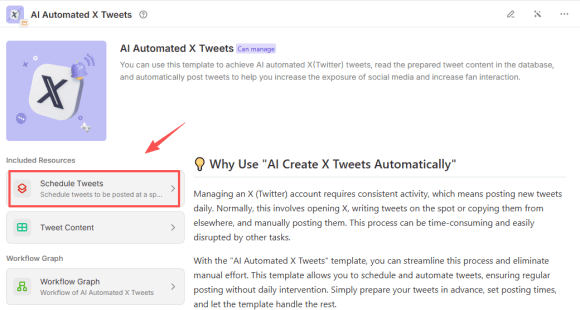
- Prepare a Database – Write tweets in advance and assign posting dates.
- Set Automation Rules – Choose a daily posting time (e.g., 10:00 AM).
- Connect to Twitter API – Authorize the app to post on your behalf.
- Enable Media Uploads – Add images, videos, or GIFs for richer content.
- Run Tests – Ensure tweets are posting correctly before full automation.
- Activate Automation – The system posts tweets automatically without daily intervention.
This approach is ideal for businesses, agencies, and creators who need high-volume, consistent posting with minimal manual work.
We’ve also prepared a more detailed guide and video tutorial.
Best Practices for Scheduling Twitter Automated Posts
To maximize engagement, follow these best practices:
- Post at Optimal Times – Research when your followers are most active.
- Balance Frequency – Too many automated posts can overwhelm followers.
- Mix Media – Use images, videos, and polls to increase interactions.
- Monitor Performance – Track engagement metrics and refine your strategy.
- Stay Authentic – Automation saves time, but engaging directly with your audience is still crucial.
Common FAQs About Twitter Automated Posts
1. Can I schedule tweets for free?
Yes, Twitter’s built-in scheduler is free, but limited in features.
2. Do automated tweets hurt engagement?
Not if managed carefully. Consistency improves engagement, but you should avoid overposting.
3. Can I schedule recurring tweets?
Twitter’s native tool doesn’t support recurring posts, but third-party tools like Buffer or Bika.ai do.
4. Is AI safe for Twitter posting?
Yes, if you authorize trusted tools. Always review tweets before automation to maintain brand voice.
Conclusion: The Best Way to Schedule Automated Twitter Posts
The easiest way to schedule automated posts on Twitter is to use the built-in scheduling tool. For advanced needs—like managing multiple accounts, bulk uploading, or AI-powered automation—third-party platforms such as Buffer, Hootsuite, or Bika.ai provide far greater flexibility. By combining scheduling with smart engagement practices, you can maintain a consistent Twitter presence, save time, and maximize audience interaction.

Recommend Reading
Recommend AI Automation Templates

Coming soon

Coming soon