Expense Tracking

Expense Tracking

author
Bika.ai
date
1 min read

Easily manage your personal and team expenses with Bika.ai’s expense tracking template. Track receipts, monitor shared expenses, gain actionable spending insights, and visualize financial data with an intuitive expense dashboard designed to simplify budgeting and control finances efficiently.

Expense Tracking
Expense Tracking
Easily manage your personal and team expenses with Bika.ai’s expense tracking template. Track receipts, monitor shared expenses, gain actionable spending insights, and visualize financial data with an intuitive expense dashboard designed to simplify budgeting and control finances efficiently.

Overview

💡 Expense Tracking

This template helps you easily track every expense, whether it's personal shopping, household purchases, Keep your spending clear and organized, making life and work more efficient and harmonious.

👉 How the template Works?

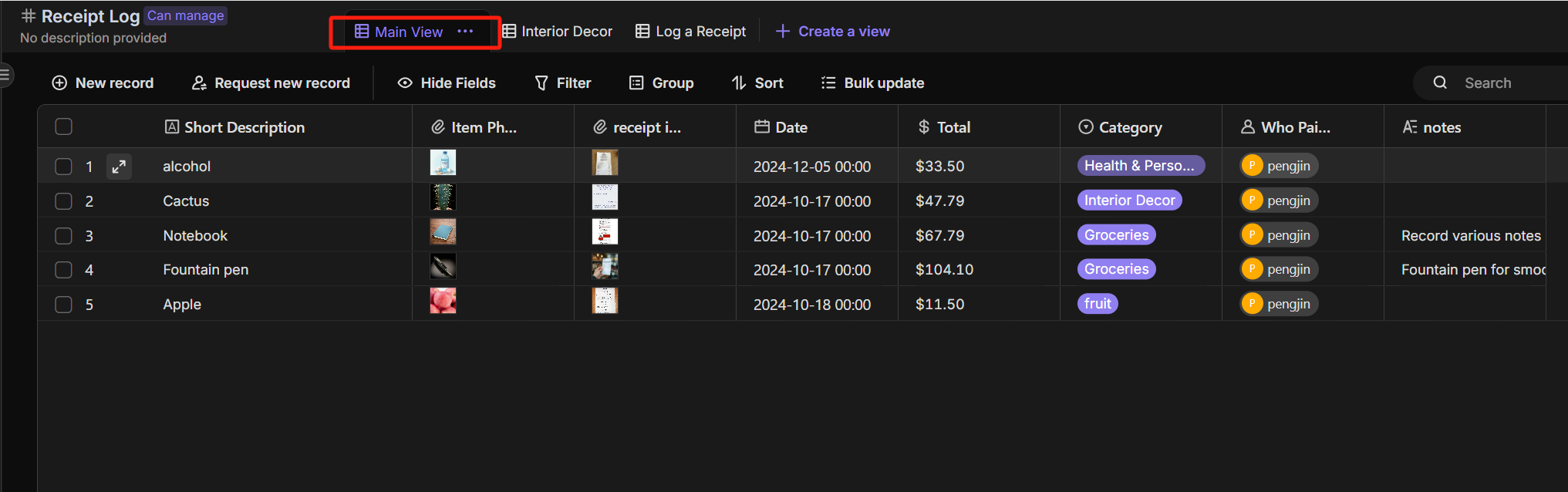
  • Users view and manage all receipt records in the Main View, where each record includes essential information such as item name, receipt photo, date.
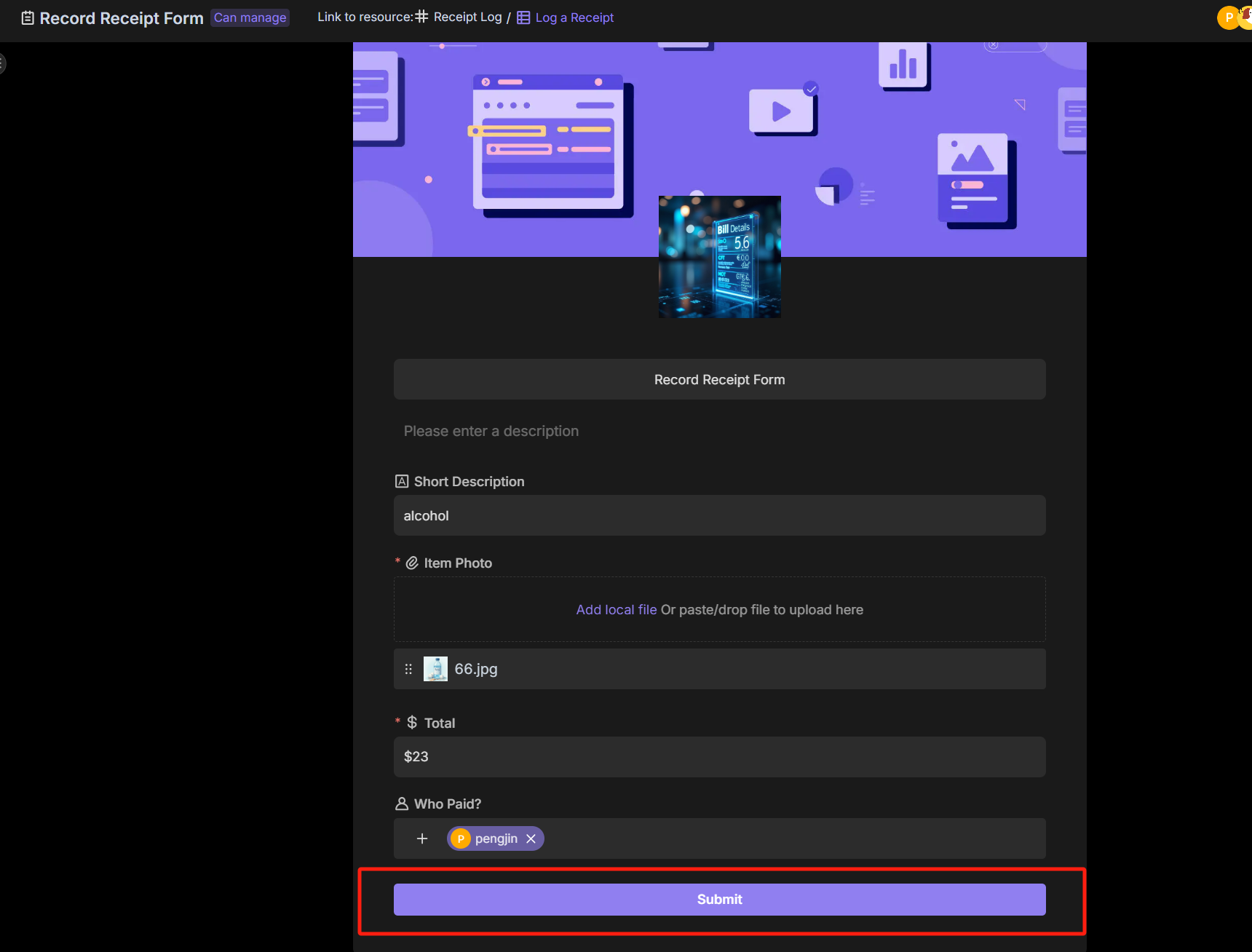
  • For more detailed entries, users select the Log a Receipt Form to fill out complete receipt details.
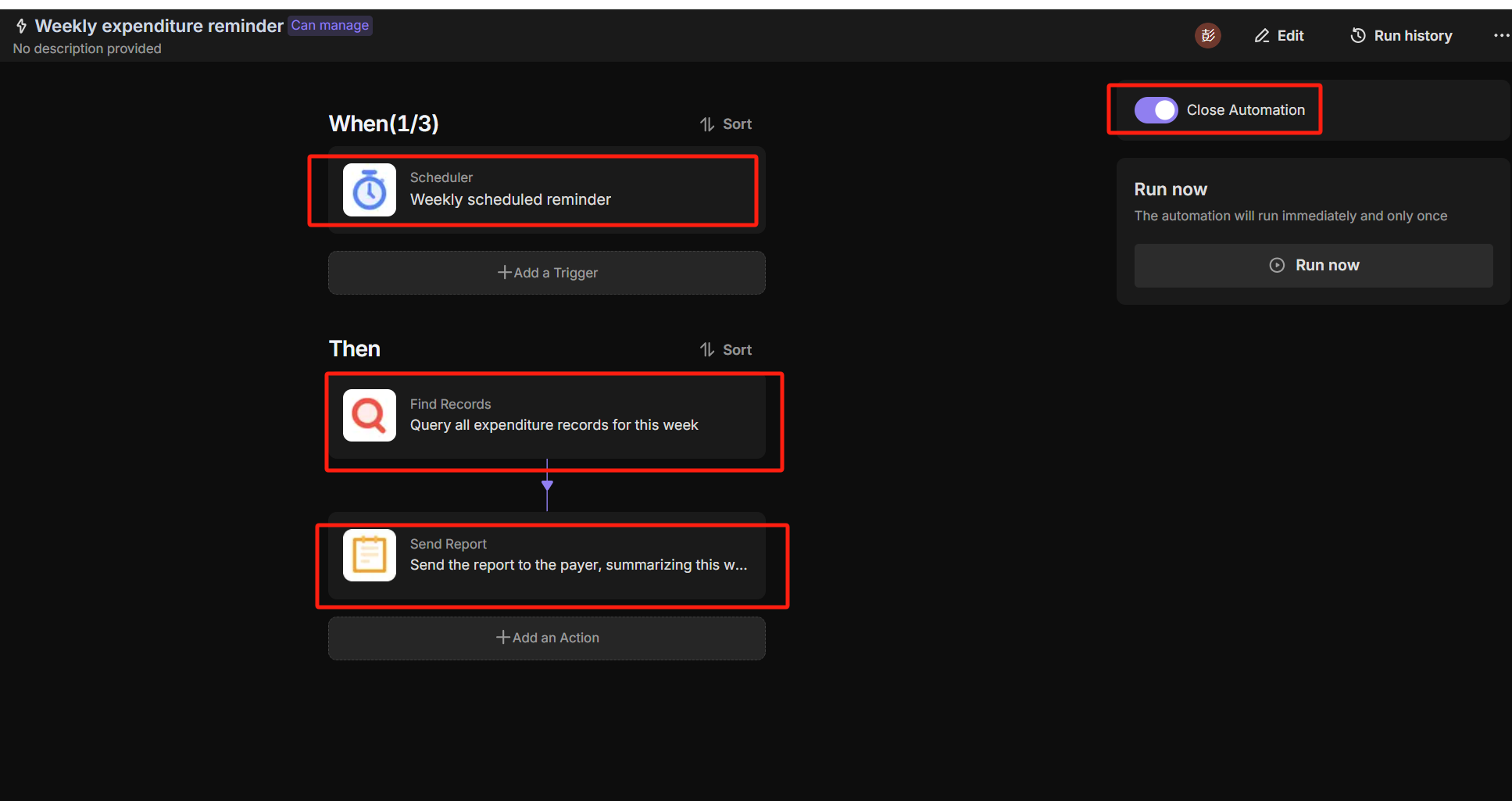
  • Based on the predefined automation workflow,The expenditure records will be automatically sent to the user every week.

🎯 Steps to Use

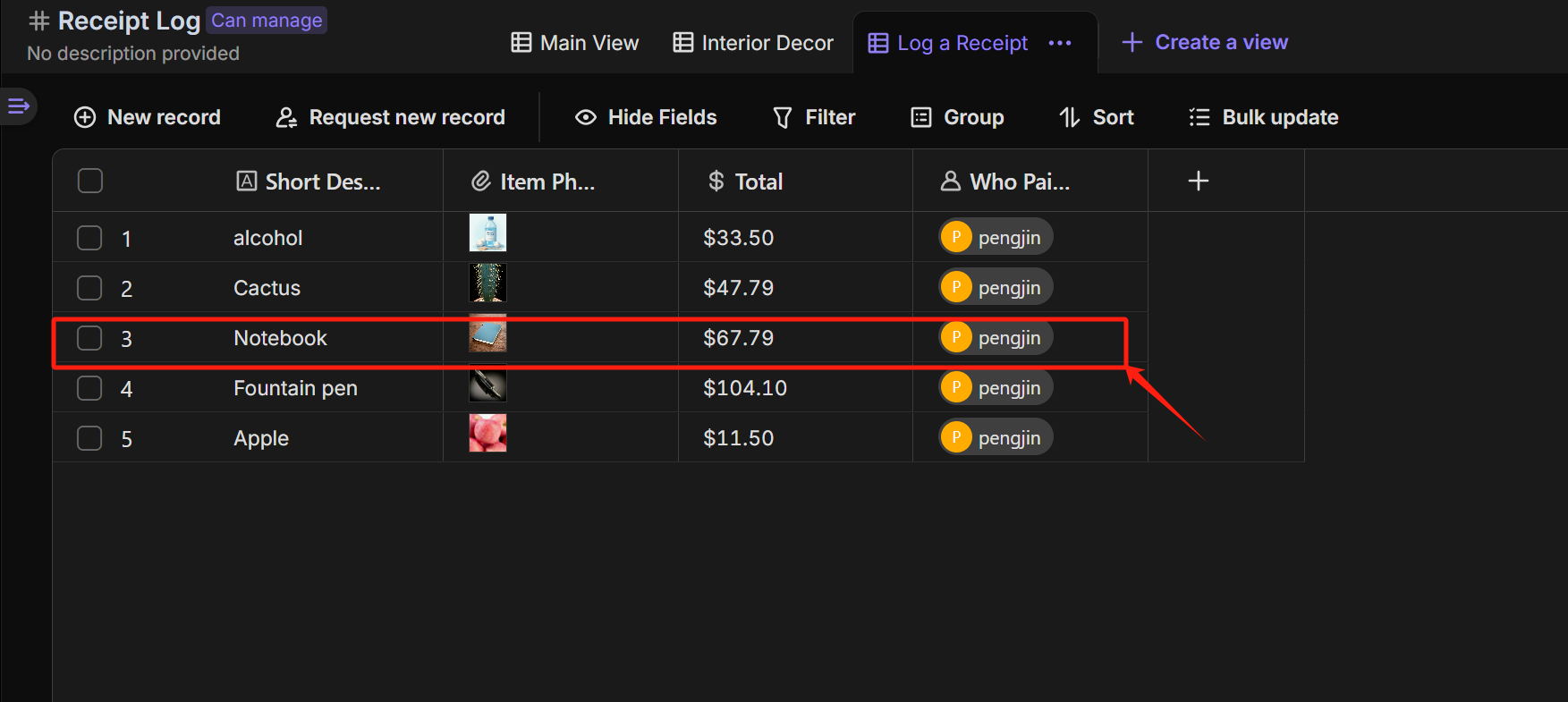
  1. Alternatively, you can use the Log a Receipt Form to provide detailed expense record information (including: Item Photo,Total, Category, and Who Paid). After submission, the record will appear in the Log a Receipt view of the Receipt Log table. Receipt Log Log a Receipt
  2. In the Main View of the Receipt Log table, you can view all expense record information. main view
  3. Set up the Weekly Expenditure Reminder automation to automatically send expense report reminders to consumers each week. Weekly expenditure reminder
👉 Who should use this template

  • Personal users, Financial managers, Business leaders, Team members

⭐ Key Features of This Template

  • Quickly submit each expense record through a form
  • Create multiple views to provide transparent expense tracking
  • Automatically send weekly expense reports via automation

FAQ

1. How do I add my own expense categories (e.g., "Travel" or "Groceries")?

The Category field is a "Single Select" field.

  1. Click the header of the Category column in the Main View.
  2. Select "Edit field".
  3. Add or remove options to match your specific spending habits.

2. Can I upload receipt photos from my phone?

Yes. The Log a Receipt Form is mobile-friendly.

  1. Open the Log a Receipt form view.
  2. Click "Share" and send the link to your phone.
  3. When you open the link on mobile, you can snap a photo of the receipt and submit it instantly.

3. How do I see the total sum of my expenses?

You don't need a calculator. In the Main View:

  1. Hover over the bottom of the Total column.
  2. Select "Sum" in the calculation bar to see the grand total.
  3. You can also use the "Group" button to group records by Category or Who Paid to see subtotals for each section.

4. How do I change when the weekly report is sent?

  1. Go to the Automation tab.
  2. Select the "Weekly Expenditure Reminder" workflow.
  3. Click the "Scheduled Trigger" node.
  4. Change the day and time (e.g., from Friday to Monday morning) to better fit your schedule.

Expense Tracking
Expense Tracking
Easily manage your personal and team expenses with Bika.ai’s expense tracking template. Track receipts, monitor shared expenses, gain actionable spending insights, and visualize financial data with an intuitive expense dashboard designed to simplify budgeting and control finances efficiently.
call to action

Recommend Reading

Recommend AI Automation Templates

Discourse Community Manager
Discourse Community Manager Agent is an AI community assistant that helps you quickly generate clear, friendly, and well-structured replies to user posts. This AI reply generator makes community moderation easier, faster, and more professional.
Business Development CRM
Streamline your business development CRM with a powerful business development template designed for effective partner management and opportunity tracking. Use this system to manage business relationship management workflows, organize key contacts, and centralize all partner information in one place. Track the full business development process and business development workflow—from initial outreach to signed partnership deals—while keeping interactions, contracts, and opportunities aligned. Ideal for teams that need a structured way to manage partnerships, improve collaboration, and stay on top of every opportunity in their pipeline.
Community Reporter
Community Reporter generates AI-powered community reports and activity reports, providing clear community insights, analytics, and highlights. Track interactions, monitor trends, and get actionable community analysis quickly and efficiently.
Brand Designer
An AI-powered Brand Marketing Assistant specially designed for start-up digital products, helping you quickly generate promotional content, visual concepts, and catchy slogans for social media and product launch campaigns. Save time while creating professional marketing assets to boost your brand impact on Product Hunt, AppSumo, and other platforms.
Content Marketing for SEO
Use the Content Marketing for SEO template as a powerful content strategy template to streamline SEO content management and content workflow management from idea to publication. This content marketing automation setup helps you align content with SEO keywords, manage personas for persona based marketing, and track every step in a visual content marketing dashboard and content performance dashboard. Improve online visibility by organizing topics, workflows, and campaigns in one place so your team can plan, produce, and optimize SEO content more efficiently.
AI Project Issues and Tickets
Use the AI Project Issues and Tickets template as a complete issue tracking template and AI-powered project ticket system for product and project teams. Collect bug tickets, customer support tickets, and feature request form submissions in one place, and manage ticket prioritization and status updates with automated notifications. Every week, an AI summary report aggregates all requests and bugs, giving project managers, product owners, QA engineers, customer support, and business analysts clear insights into user feedback, development progress, and your overall AI project workflow.