How to Schedule Bulk Posts on Twitter?


Scheduling bulk posts on Twitter (X) is entirely possible using automation tools. With platforms like Bika.ai’s AI Automated X Tweets, you can prepare hundreds of tweets in a database, assign posting dates and times, and let the system automatically publish them without manual intervention. This ensures a consistent posting schedule, maximizes audience engagement, and saves hours of daily effort for social media managers, brands, and content creators.
Why Bulk Scheduling Twitter Posts is Essential for Social Media Growth
Bulk scheduling helps maintain a steady presence on Twitter, which is crucial for:
- Consistent Engagement – Frequent posts keep your account active and favored by the platform’s algorithm.
- Time Management – Plan weeks of content in advance, freeing time for creative work or community interaction.
- Optimal Posting Times – Reach your audience when they are most active, boosting impressions and engagement.
- Data-Driven Strategy – Monitor which posts perform best and adapt future content accordingly.
For brands and influencers, bulk scheduling is a core strategy to scale social media efforts efficiently.
How AI Automated X Tweets Streamlines Bulk Posting

Bika.ai’s AI Automated X Tweets platform simplifies bulk posting with AI-powered automation:
- Database-Driven Workflow: Store all tweets in a database with content and scheduled posting dates. You can bulk import up to hundreds of thousands of tweets.
- Automated Daily Posting: The system retrieves scheduled tweets each day and posts them via the Twitter API.
- Media Integration: Upload images, videos, or GIFs in bulk and attach them automatically to scheduled tweets.
- Loop Posting: Automatically iterate through multiple tweets for seamless bulk publishing.
This approach eliminates repetitive manual posting and ensures every scheduled tweet goes live on time.
Step-by-Step Guide to Scheduling Bulk Tweets With AI
Step 1: Prepare Your Tweets in the Database

- Open the X Tweet Content database in Bika.ai.
- Add new tweets in the Content field.
- Assign posting dates for each tweet to automate daily delivery.
- Example: 50 tweets scheduled over 10 days to maintain consistent posting.
Step 2: Configure Automation Settings
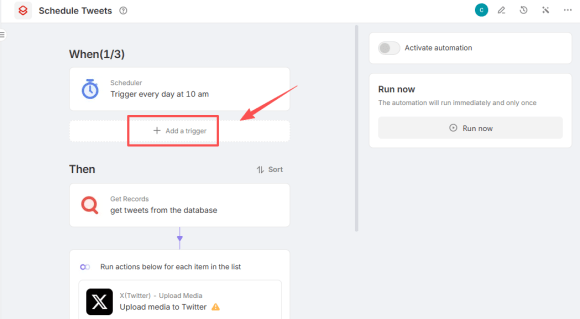
- Go to the AI Automated X Tweets workflow.
- Set the trigger to run daily at your preferred time.
- Ensure the Find Records action retrieves today’s scheduled tweets.
- Test the loop to verify all tweets are correctly picked up.
Step 3: Upload Media Files (Optional)
- If tweets include images, videos, or GIFs, upload them via the Upload Media Files action.
- Media URLs will automatically attach to corresponding tweets in the loop.
- Supports up to 4 media files per tweet.
Step 4: Enable Tweet Posting Automation

- Run a test to confirm tweets are posting correctly.
- Enable the automation for daily automatic bulk posting.
Tips for Optimizing Bulk Twitter Posting
- Plan Content Ahead: Organize tweets by theme, campaign, or trending topics.
- Use AI for Drafting: Generate tweet ideas automatically with AI to save time and maintain engagement.
- Monitor Analytics: Track performance and adjust posting frequency or content style.
- Balance Text and Media: Include images, videos, or GIFs to increase impressions and clicks.
- Avoid Spam: Space out bulk tweets to maintain authenticity and prevent follower fatigue.
Advantages of Using AI for Bulk Twitter Automation
- Efficiency: Automates repetitive posting tasks.
- Consistency: Keeps your account active without daily manual effort.
- Scalability: Easily schedule hundreds of tweets across multiple campaigns.
- Engagement Optimization: Schedule posts at peak engagement times for maximum reach.
- Error Reduction: Minimizes mistakes caused by manual posting.
Conclusion: The Best Way to Schedule Bulk Tweets
Bulk scheduling on Twitter is no longer cumbersome thanks to AI-powered tools like Bika.ai’s AI Automated X Tweets. By combining a database of prepared tweets with automated posting, brands, influencers, and social media managers can maintain a consistent presence, engage their audience effectively, and save hours of time each week. Start scheduling bulk posts with AI to take your Twitter strategy to the next level.

Recommend Reading
Recommend AI Automation Templates