
Automated Currency Data Retrieval (Python)

Automated Currency Data Retrieval (Python)

author
Bika.ai
date
1 min read

The Automated Currency Data Retrieval (Python) template runs a scheduled job to fetch specific currency rates every day and store them in a structured table, building clean historical exchange rate data over time. Use it for financial data automation that powers dashboards, alerts, and automated financial reporting, so finance teams, forex traders, accountants, and risk managers always have up-to-date FX data at hand. By automating data collection, you save time, reduce manual errors, and make better investment and risk decisions based on reliable exchange rate history.

Automated Currency Data Retrieval (Python)
The Automated Currency Data Retrieval (Python) template runs a scheduled job to fetch specific currency rates every day and store them in a structured table, building clean historical exchange rate data over time. Use it for financial data automation that powers dashboards, alerts, and automated financial reporting, so finance teams, forex traders, accountants, and risk managers always have up-to-date FX data at hand. By automating data collection, you save time, reduce manual errors, and make better investment and risk decisions based on reliable exchange rate history.

Overview

Automated Currency Data Retrieval(Python)

This template helps you automatically retrieve the specified exchange rate information every day and store it in the database. It allows users to easily track and analyze exchange rate fluctuations, saving time and human resources, thereby improving the efficiency of investment decision-making.

🎯How the template works

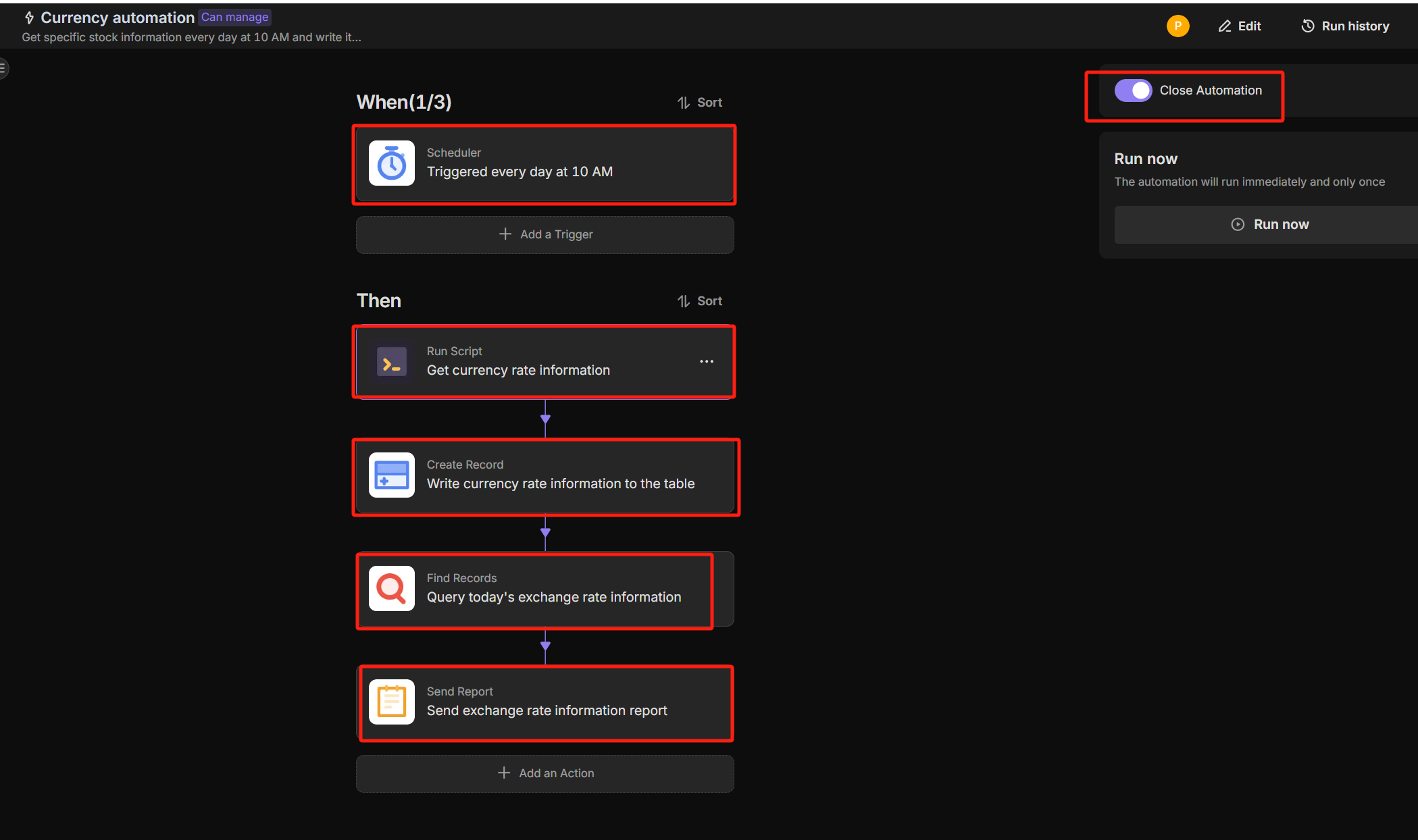
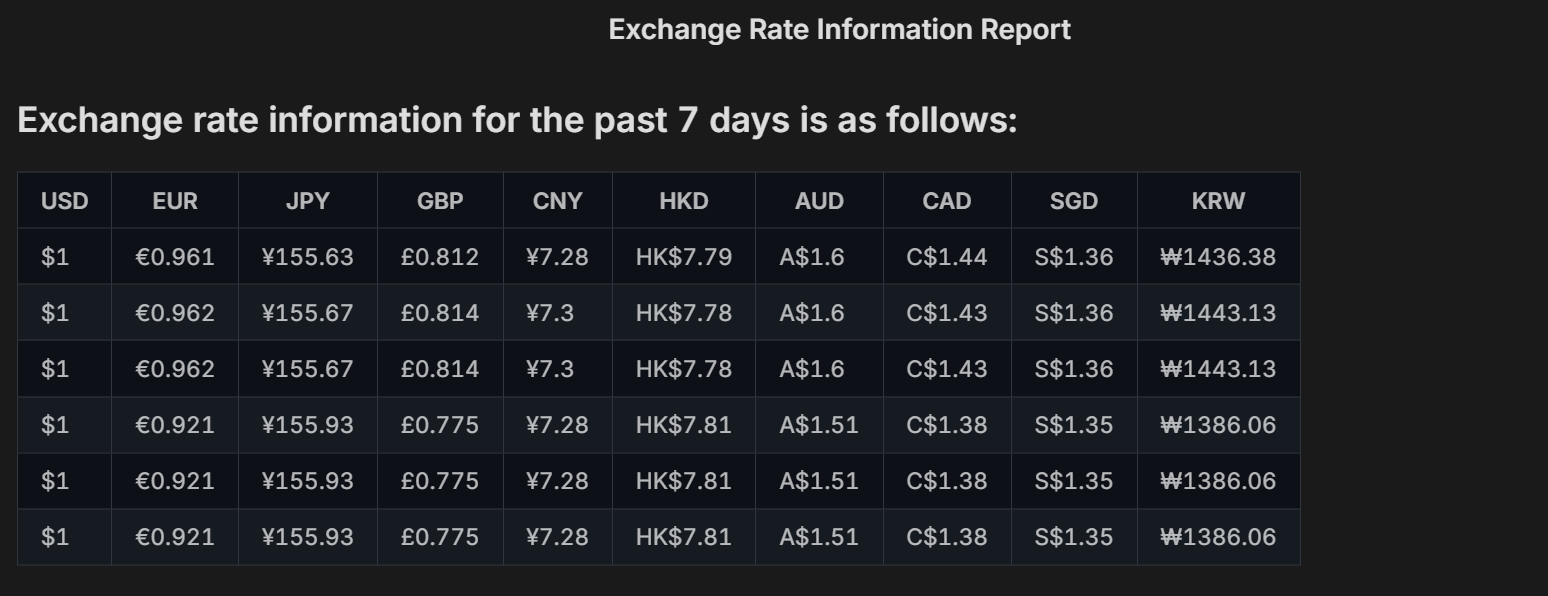
  • Currency Automation: Automatically executes the exchange rate fetching task at 10:00 AM every day, And automatically send the exchange rate information report daily.
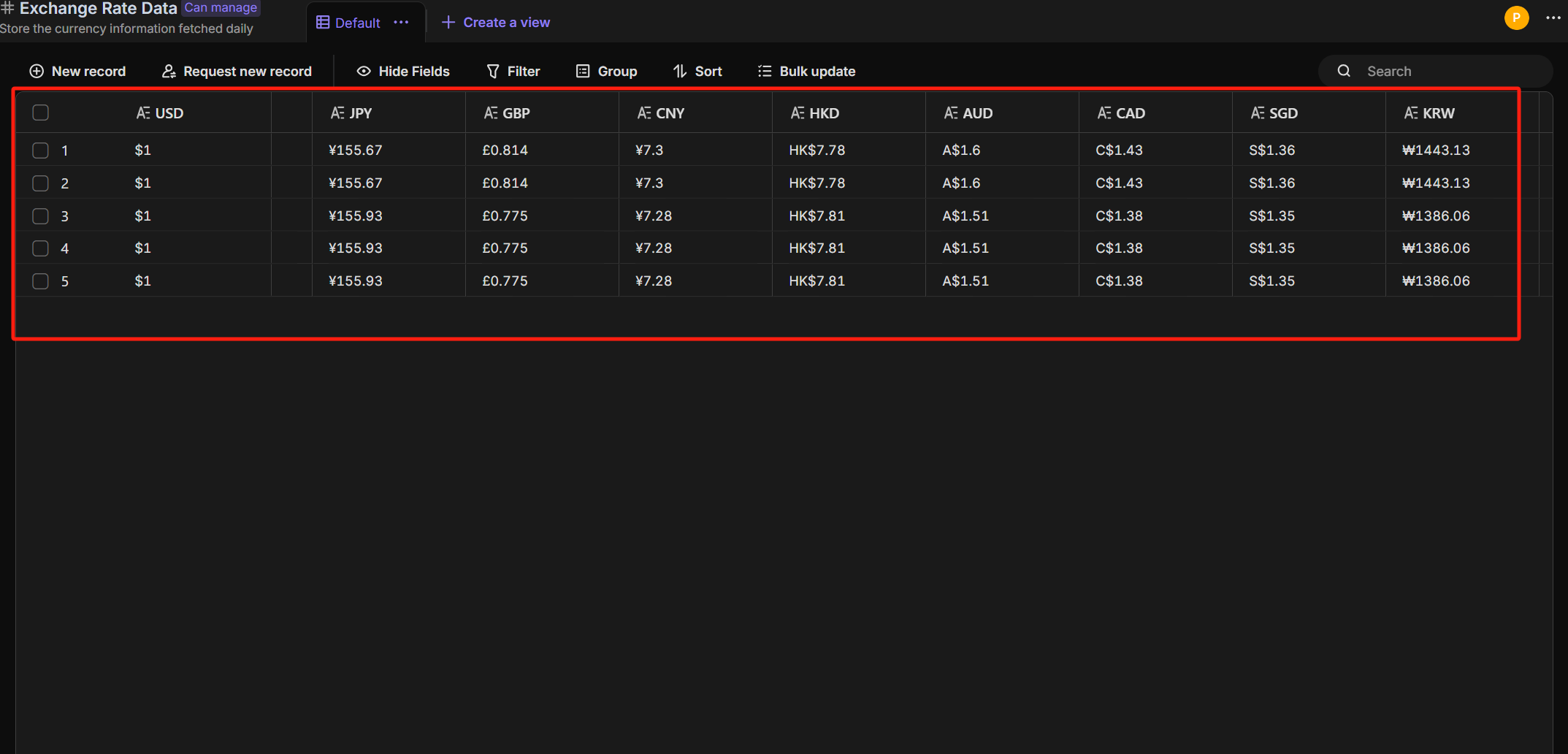
  • Exchange Rate Data: The retrieved exchange rate data will be displayed in the "Exchange Rate Data" table.

🎯 Steps to Use

  1. Currency Automation: automatically performs the exchange rate fetching task at 10:00 AM every day.
Currency Automation

report

  1. Exchange Rate Data: The retrieved exchange rate information will be displayed in the "Exchange Rate Data" table.
Exchange Rate Data

👉 Suitable Users

Finance personnel, Forex traders, Accountants, Risk management personnel

⭐ Key Features of This Template

  • Scheduled automatic retrieval of exchange rates
  • Data storage functionality
  • Investment support

FAQ

1. Do I need an external API Key for this to work?

Yes. The Python script in this template is designed to query a currency exchange data provider (such as ExchangeRate-API, Alpha Vantage, or Open Exchange Rates). You will need to:

  1. Register for a free API key from a provider of your choice.
  2. Open the Automation tab and click on the Python step.
  3. Replace the placeholder text (e.g., 'YOUR_API_KEY') with your actual key.

2. Can I track specific currency pairs (e.g., USD to JPY)?

Yes. You can customize the currencies by editing the variables in the Python script. Look for the list defining the target_currencies (e.g., ['EUR', 'GBP', 'CNY']). Simply update this list with the ISO codes of the currencies you wish to monitor.

3. Do I need to know how to code in Python?

Not necessarily. The template comes with a pre-written, functional script. You only need to perform simple text replacements (like pasting your API key or changing currency codes). You do not need to write complex logic from scratch.

4. Can I change the update frequency?

The template is set to run daily at 10:00 AM by default. You can change this by clicking the "Scheduled Trigger" node in the automation workflow and selecting a different time or frequency (e.g., every hour or weekly) to suit your trading needs.

Automated Currency Data Retrieval (Python)
The Automated Currency Data Retrieval (Python) template runs a scheduled job to fetch specific currency rates every day and store them in a structured table, building clean historical exchange rate data over time. Use it for financial data automation that powers dashboards, alerts, and automated financial reporting, so finance teams, forex traders, accountants, and risk managers always have up-to-date FX data at hand. By automating data collection, you save time, reduce manual errors, and make better investment and risk decisions based on reliable exchange rate history.
call to action

Recommend Reading

Recommend AI Automation Templates
Automation Call to Third-Party AI Platform for Text-to-Speech
This template lets you automatically convert text to MP3 by calling a third‑party AI text‑to‑speech platform. Store scripts, lessons, or support content in a table, switch the status to start conversion, and get MP3 files back in the record without any manual audio editing. Use it for video narration, online courses, podcast scripts, product demos, and language learning audio so creators, educators, and training teams can scale content production with a simple, automated text‑to‑speech workflow.

Coming soon

 Content Review
Content Review
Efficient content review template with review automation, approval workflow, and real-time review status updates. Improve accuracy, speed up content approval, and reduce manual tasks.
AI Sales Report
AI Sales Report
The AI Sales Report template turns raw sales data analysis into automated sales reporting and a clear weekly sales report for every store. Use AI sales analytics and AI retail analytics to run sales performance analysis, sales performance monitoring, and sales trend analysis across locations. It works like AI business intelligence for retail teams, supporting business analyst reporting, automated report delivery, and trend analysis for sales so managers and analysts can make faster, data‑driven decisions without manual reporting.
AI Auto-Tweet with Image
Automate your X (Twitter) content with the AI Auto-Tweet with Image template. Use it as a Twitter post scheduler and Twitter automation tool that reads tweet content from your database, generates tweets with AI, uploads images, and auto-posts to X. Batch pre-write tweets, update their status to Publish, and let the workflow handle tweet scheduling, posting, and link tracking—perfect for social media managers, creators, and brands who want consistent Twitter activity without manual posting.
Discourse Community Manager
Discourse Community Manager Agent is an AI community assistant that helps you quickly generate clear, friendly, and well-structured replies to user posts. This AI reply generator makes community moderation easier, faster, and more professional.
Github Issues Creator
Automate your GitHub workflow with AI. The GitHub Issues Creator generates ready-to-use GitHub issue templates, streamlines issue tracking, and ensures every bug, task, and feature request follows a consistent, professional format — perfect for product managers and agile teams.